
Showing posts with label Download Manager. Show all posts
Showing posts with label Download Manager. Show all posts

Orbit's primary interface is bland, but the basic toolbar and info boxes guarantee everything is easy to find. Orbit shines with Internet Explorer integration. To get a media file, simply right-click a video or photo and choose Download from your context menu. Grabbing a Flash game is even easier. Hover over a Flash file, and Orbit displays a button for a fast download.
Fast and small are key traits of this application. It uses a bare minimum of memory, and downloads are much faster than with a browser alone. Where Orbit shines is its one-button simplicity for downloading multiple files on a site. From there, you can easily filter for file type. Orbit's numerous configuration options make it one of the more flexible download managers available.
Although designed to integrate with the IE, Firefox, Opera and Maxthon, we had great difficulty getting Orbit to work seamlessly with Firefox. We finally gave up trying to get the Flash download feature to work. Nevertheless, anyone downloading large numbers of files will find this freeware indispensable.
Download >> Orbit Downloader 2.8.18 Free
Label:
Download Manager
 Free Download Manager - This freeware, open-source application presents a new version with some minor bugs fixed and new features that really enhance its performance. Free Download Manager will let you have full control over your downloads, accelerating download speed to squeeze your bandwidth.
FDM works dividing files into several segments and downloading all of them at the same time, reducing significantly download time while taking the most of your internet connection. With FDM you will be able to download files from HTTP, HTTPS and FTP, now with the additional support for BitTorrent protocols. FDM includes a scheduler that will let you set the time for specific downloads to start, with the possibility to shut down the computer when a download is complete, and resuming broken downloads. It integrates with your antivirus program to analyze downloaded files and warn you in case they contain malicious code.
New features include: HTML Spider, allowing users to download complete websites or specific files from them, and the possibility of creating a portable version of FDM to easily use it in other computers or to take it in a memory stick, avoiding installation and enjoying its full functionality.
On the other hand, you can download flash videos from the most popular video-streaming sites, and save them in their original format or converting them into AVI, MPEG 4, WMV, etc. with FDM's built-in media converter. Once download is complete, you can organize your files in the most convenient way, in folders according to file types, names, and other criteria within its simple and intuitive interface.
Free Download Manager is one of the most complete applications to manage your downloads, probably the best among the free ones, and definitely an indispensable tool.
Download Free Download Manager
FreeDownloadManager.ORG
Label:
Download Manager,
open source
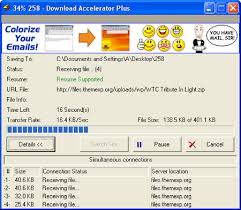 Download Accelerator Plus (DAP) - The world's most popular download manager, with over 170 million users worldwide. DAP accelerates your download speed so you can get all your favorite files, applications, and videos as fast as possible. Additionally, DAP features powerful privacy, security, and file management tools letting you download with confidence and flexibility. DAP is easy to use, working automatically with your web browser to provide the fastest download speed possible.
 DAP 9.1 has been enhanced with the most requested features to provide an even better download experience. Downloading is safer in DAP 9.1 with innovative new download security powered by SpeedBit's Multi Antivirus (MAV) Analysis. In DAP 9.1 you can now choose your Download Style, with Internet Explorer style downloading, that lets you get files with Download Windows, and Firefox style downloading, that presents all your downloads in a Download list.
DAP is also being translated into multiple languages by users working on the DAP Wiki project, and support for Internet Explorer 8 and Windows 7 has been added. Additionally, expansions are available for DAP that provide for downloading and acceleration of your favorite videos from YouTube and other popular video sites. Get the latest DAP at www.speedbit.com or http://download.cnet.com/Download-Accelerator-Plus/3000-2071_4-10037157.html
Download DAP Now
Label:
Download Manager
Subscribe to:
Posts (Atom)


