
Features:
- Easy loading, editing and saave ID3 tags of music files
- Locating your songs into different database
- Grouping your music collections
- Drag and drop playlist made
- Extended digital equalizer and DSP settings
- Rip and Burn music into CD
- Organizing downloaded music files
- Show album art
- Creating your own skins, customizable look of features of dajukebox
- Portable - no installation required
Publisher :Visit Website
Os :Win 9x/ME/NT/2K/XP/2K3
Download >>Soundbase is free software for managing, editing, and playing http://freesoftwarefile.com/dl/files/soundbase.exe

Power AMR MP3 Audio Converter - An audio conversion software that helps you convert various audio formats (WAV, MP3, MP2, MP1, MPEG, MP4, M4A, AAC, OGG, AVI, MPC, MOV, QT, AIFF, AU, AC3, WMA or 3GP to WAV, MP3, MP2, OGG, AC3, VOX, WMA or AMR format).
Here are some key features of "Power AMR MP3 Audio Converter":
- Convert WAV, MP3, MP2, MP1, MPEG, MP4, M4A, AAC, OGG, AVI, MPC, MOV, QT, AIFF, AU, AC3, WMA or 3GP to WAV, MP3, MP2, OGG, AC3, VOX, WMA or AMR format.
- Support Add full folder.
- Simple, easy-to-use and highly customizable interface.
- Fast Conversion Speed - audio format conversion is performed directly without any temporary files, and thus enables high converting speed and economy of hard disk resource.
- Batch audio files conversion.
 MediaCoder is a free transcoder tools for audio and video, it is putting together many great software from the community of open source into one friendly GUI. At the video side, MEncoder used as the back-end and provides support for neraly all kind of video compression and container format, as well as rich and usefull video filtering features such as post-processing and 3D de-noise. On the audio side MPlayer and Winamp input plugins used as the decoders with various other encoders integrated, MediaCoder can simply batch transcode among any known audio formats, with tags transferred, file names generated, and even performing audio filtering (e.g. resample, normalize) on the fly.
 Typical applications:
- Improving compression / reducing file size (audio+video -> audio+video)
- e.g. MPG/VOB/AVI/RMVB/MOV/MP4 -> AVI/MKV/MP4 (Xvid/DivX/H.264 + MP3/OGG/AAC)
- Extracting audio track (audio+video -> audio)
- e.g. MPG/VOB/AVI/RMVB/MOV/MP4 -> MP3/OGG/AAC/MPC
- Converting to normal VCD/DVD player ready video files (audio+video -> MPEG)
- e.g. RMVB/MOV -> MPEG 1/2
- Converting from lossless or high-bitrate audio to low-bitrate audio to play with portable DAP (audio -> audio)
- e.g. APE/FLAC/WavPack (+ CUE sheets) -> MP3/AAC/WMA
- Ripping CDs and compressing it on the fly
- e.g. CD tracks-> APE/FLAC/WavPack/MP3/OGG/AAC/WMA/MPC
Supported source formats:
- Audio: MP3, OGG/Vorbis, AAC, MusePack, WMA, RealAudio, FLAC, WavPack, APE/APL, WAV
- Video: AVI (Xvid/DivX/H.264), MPEG1/2/4, QuickTime (mov), WMV/ASF, RealMedia (rmvb), MP4, Matroska (mkv)
- CUE Sheets, CD, VCD, DVD
- Supported target audio formats:
* Lossy: MP3, OGG/Vorbis, AAC, AAC+/Parametric Stereo, MusePack, WMA
* Lossless: FLAC, WavPack, Monkey´s Audio (APE), WMA Lossless, WAV - Supported target video formats:
* H.264, Xvid, DivX 4/5, MPEG1/2/4, H.263 etc. - Supported target container formats:
* AVI, MPEG 1/2, Matroska, MP4
Download : Advanced Karaoke Player 4.2

Virtual DJ 6.0.1 - With effects, samples, and transitions that rival vinyl turntablisms, Virtual DJ lets anyone produce polished MP3 mixes.
At the top of the graphically-intense interface, song-structure visualizations show the beats as the music plays. Two simulated turntables play the currently- loaded tracks. Windows below the turntables show samples, effects, music search, recording, program options, and an Explorer-style interface for loading music. You'll need to download an MP3 encoder if you don't want to record files in WAV format.
Virtual DJ not only can create audio collages, but it now also can make montages of video clips. The stylish interface and high number of features score points, but learning how to use the program is a hit-or-miss proposition. Fortunately, the program offers a thorough user guide. Virtual DJ is well worth a look both for aspiring mixers and newbies.
download Virtual DJ
 Audio Mid Recorder - Good enough powerful real-time sound recorder from any resource such as Mid, MP3, WAV, WMA, RM, OGG,VQF, CD, DVD, MPEG, AVI, MOV, GAME, FLASH, Streaming Audio on Internet, even from all peripheral equipment such as Microphone, Cassette Tape, TV, Radio, Electronic Organ, Video Tape, CD Player, DVD Player, PS2, Xbox, it offering professional recording features for saving as mp3,wav,wma,ogg formats without costing any other disk space.
Audio Mid Recorder is designed to work directly with your sound card, so can record almost all audio from your sound card at near-perfect quality what you can hear from your speaker.
- Grab audio from all multimedia files can be played with any audio player and video player such as Windows Media Player, Winamp, Real One Player, QuickTime Player, Windvd
- Grab audio from Game, Flash, Application, and Streaming Audio on Internet.
- Grab audio from all peripheral equipment which is linking to your PC.
- Auto Activation System, File Length Limitation System,Hotkeys Setting, Wizard and Schedule will help you to conveniently customize your recording tasks, so you can record your favorite online audio program even while you're at work ! And you can using it as sound snooper for Conference recordings, Phone calls monitoring and recording, Radio broadcasts logging, Spying, employee monitoring, etc.
- MIDI, RAM, CD, WMA, WAV, MP3, APE, OGG Audio Files to MP3,WAV,WMA,OGG
- DVD,MPEG,AVI,ASF,MOV, RM, MPEG4,VOB video Files
- Flash, Game , Application , Stream Audio Audio Resource
- Microphone, Cassette Tape, Radio, Electronic Organ, CD Player, LP, TV, Video Tape, DVD Player, PS2, Xbox Peripheral Equipment
 The Acoustic Labs Multitrack Plus, once of audio editing softwares,which is powerful and versatile multitrack recorder, editor, sequencer and mixer allowing users to create professional quality audio productions. Audio loop creation, sequencing and mixing are also fully supported. The multitrack recording capabilities are perfect for producing music and a variety of other audio production needs.
Download The Acoustic Labs Multitrack Plus
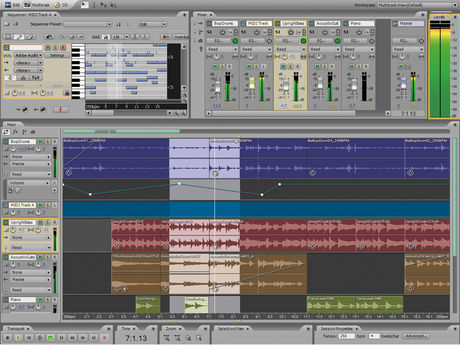 Adobe Audition 3.0 - A Powerfull audio editor/multitrack, one of the best! And even better, you can bring it with you on a USB key. Perfect for those who use multiple computers or those who don’t have a lot of space on their hard drive! 100% tested and working.
http://rapidshare.com/files/246912356/Nero_9_Portable.rar.html http://www.4shared.com/get/56695268/cd5833af/Portable_Adobe_Audition_30.html
No password needed!!!
DESCRIPTION :Sound your best Recording, mixing, editing, and mastering — Adobe® Audition® 3 software is the all-in-one toolset for professional audio production.
Use Adobe Audition 3 to:
- Create your own music
- Record and mix a project
- Produce a radio spot
- Clean up audio for a movie
- Compile and edit a soundtrack
- Whatever you do with audio, Adobe Audition 3 software helps you sound your best.


